
In our last post, we pulled back the curtain on what AI actually is: a sophisticated prediction engine, not a sentient brain. But knowing how the engine works is only half the battle. To get the most out of AI today, you have to know how to drive it.
If you’re still using AI like a Google search bar—typing in a single question and accepting the first answer—you’re using about 10% of its power. The secret to AI literacy isn’t “prompt engineering” (the old art of finding the “magic words”). It’s Workflow Design.
Here is how to move from asking questions to building systems.
The End of the “One-Shot” Prompt
In the early days, we tried to get everything right in one go: “Write a 500-word blog post about gardening in the desert.” The result was usually “fine,” but generic.
Now, we use Iterative Loops. Instead of one big command, break it down:
- Phase 1 (Research): “Search for the top five challenges of desert gardening in Arizona.”
- Phase 2 (Outline): “Based on those challenges, create a structured outline for an article.”
- Phase 3 (Drafting): “Draft the first section, but use a conversational, witty tone.”
- Phase 4 (Refining): “Critique this draft. Is it too technical? Adjust the reading level for a beginner.”
The Rule: If the task takes a human more than 10 minutes, don’t expect the AI to do it in one prompt.
Multi-Step Agentic Workflows
As we discussed in the first post in this series, we are now in the era of Agents. This means you can give the AI a goal rather than just a task.
Old way: “Find me a hotel in London.”
New way: “I’m going to London from June 10th to 15th. Find three hotels under $300/night that are within walking distance of a Tube station, have a gym, and positive reviews for their breakfast. Cross-reference these with my calendar to make sure they aren’t too far from my scheduled meetings at Canary Wharf.”
By giving the AI permission to browse, reason, and compare data points, you aren’t just getting a recommendation; you’re delegating a project.
Your New Job Title: Editor-in-Chief
Because AI is a “statistical guessing machine,” it is prone to something called Confident Hallucination. It can cite a law that doesn’t exist or a scientific study that was never published, all while sounding perfectly professional.
To work safely with AI, you must adopt the mindset of an Editor-in-Chief.
- Verify the Facts: If a specific number, date, or legal quote is crucial to your work, never take the AI’s word for it. Ask it for the source link, or better yet, verify it via a trusted source.
- The “Human Polish”: AI-generated text often has a “smooth” but hollow feel (sometimes called “AI Slop“). Your value is adding the human element: personal anecdotes, unique opinions, and current cultural context that the AI simply doesn’t possess.
The Chain of Thought Technique
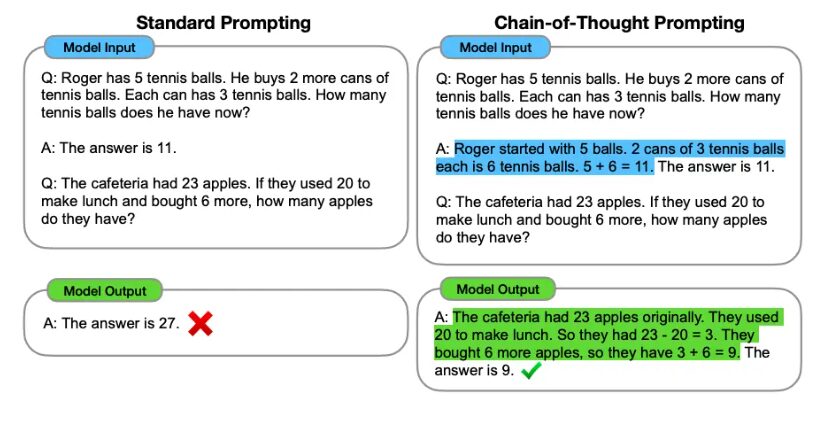
If you find the AI is giving you poor logic or making math errors, use a simple trick: ask it to think step-by-step. When you require the AI to write out its reasoning process before giving the final answer, it significantly reduces errors. It’s like asking a student to “show their work” on a math test. By laying out the logic in the chat window, the AI anchors itself to the facts it just wrote, leading to a much more accurate conclusion.
Our Takeaway
Today, AI is no longer a vending machine where you put in a coin and get a snack. It’s a collaborative partner. The most successful people today aren’t the ones who write the “best” prompts; they are the ones who know how to break a big project into small steps, verify the output, and steer the AI toward a high-quality finish.
Disclosure Statement:
One great benefit of AI is the ability for an AI tool to help you organize your thoughts, ideas, and keep you from getting too far into the weeds on a project or narrative. This is the case with this article. I used Google’s Gemini to help me organize my ideas and understanding about the topic. The AI tool provided improved narrative based upon a draft and notes I provided as a prompt, which I then edited for accuracy, style, and relevance.
Resources:
- Google Gemini
- Originality.ai prompt generator
- AI Hallucinations Explained: Why AI Makes Confident Mistakes – Neha Mondal (uniathena: March 26, 2026)
- When AI Gets It Wrong: Addressing AI Hallucinations and Bias – MIT Sloan Teaching & Learning Technologies
- What is Chain of Thought (CoT) Prompting? – IBM
- Chain of Thought Prompting – Prompt Engineering Guide
- Notable Quotes on AI – Stew Alexander (Medium: May 23, 2024)
- Wikipedia – Artificial Intelligence
- Wikipedia – Hallucination (artificial intelligence)
.png)
- Book Club Author Suggestion: Maggie O’Farrell - June 3, 2026
- Book Club Author Suggestion: David Grann - May 5, 2026
- From Prompts to Partners – The Art of the AI Workflow - April 16, 2026